


RYOEX Withdrawal Guide | How to Withdraw Funds and Manage Withdrawal Accounts

 2026-03-18
To withdraw funds on RYOEX, it is important to understand the correct withdrawal procedures and how to manage your registered withdrawal accounts.
This guide provides a clear, step-by-step explanation of the following topics:
-
How to Transfer Funds: Step-by-step instructions for moving funds from your trading account to your wallet.
-
Withdrawal Methods: How to withdraw via bank transfer or cryptocurrency (USDT).
-
Managing Withdrawal Accounts: How to register, edit, or delete your withdrawal account information.
-
FAQs: Answers to common questions regarding withdrawal fees, limits, processing times, and more.
By following this guide, even first-time users can proceed with confidence and complete their withdrawals smoothly and securely.

How to Transfer Funds|Moving Funds from Your Trading Account to Your Wallet
Before initiating a withdrawal, you must first transfer funds from your trading account to your RYOEX Wallet A withdrawal to a bank account or cryptocurrency wallet can only be processed once the funds have been reflected in your wallet. Fund transfers are completely free of charge, so you can proceed with confidence.
Step 1. Open the Fund Transfer Page
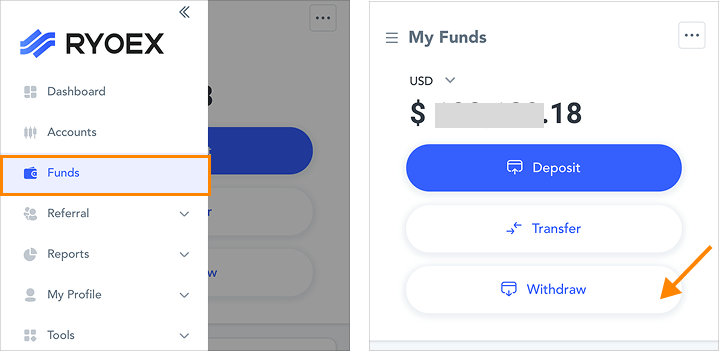
After logging in to My RYOEX, navigate to the menu and select “Fund Management” → “Transfer Funds.”
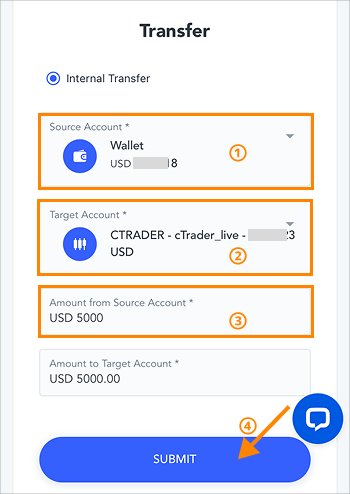
Step 2. Transfer Your Funds
-
1.
In the “Transfer From” section, select the trading account from which you want to withdraw funds.
-
2.
In the “Transfer To” section, select the trading account to which you want to deposit funds.
-
3.
Enter the amount you wish to transfer. The corresponding amount for the destination account will be automatically calculated.
-
4.
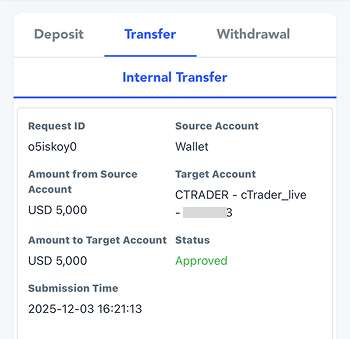
Click “Confirm” to display your transfer history.
Once the status changes to “Approved,” the fund transfer is complete. You can then proceed with the withdrawal process from your wallet.
【▼Fund Transfer Successful】
Withdrawal Methods|How to Withdraw via Bank Transfer and Cryptocurrency
RYOEX supports withdrawals via bank transfer and cryptocurrency (USDT). Below is the step-by-step guide for withdrawing funds via bank transfer.
How to Withdraw via Bank Transfer
Step 1. Open the Withdrawal Page
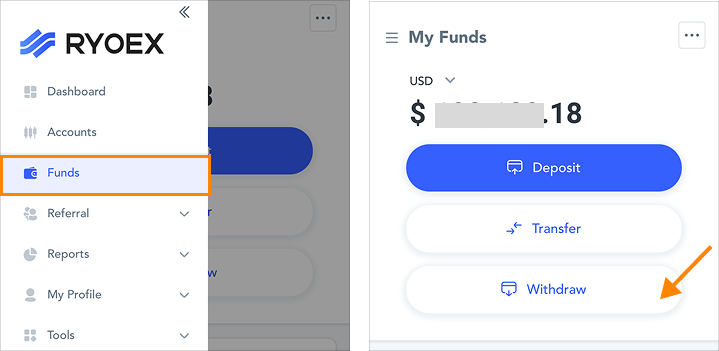
After logging in to My RYOEX, click “Withdrawal” directly from the dashboard, or navigate to “Funds Management” → “Withdrawal”from the menu to access the withdrawal page.
Step 2. Enter Your Withdrawal Details
-
1.
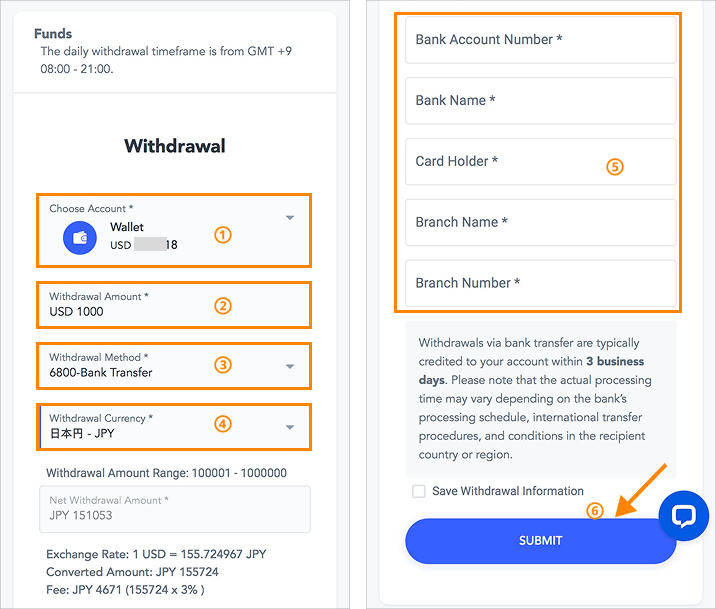
Under “Select Account”, choose “Wallet USD”.
-
2.
Enter your desired amount in the “Withdrawal Amount” field.
-
3.
Select Bank Transfer as your withdrawal method. Withdrawal fees will apply based on the amount you request.
-
0 – 680 USD: 5% fee
-
680 – 6,800 USD: 3% fee
-
6,800 – 68,000 USD: 1% fee
-
Above 68,000 USD: Free of charge
-
-
4.
Select “Japanese Yen – JPY” under “Withdrawal Currency,” and the net withdrawal amount will be automatically converted at the latest exchange rate.
-
5.
Enter your bank account details: account number, bank name, account holder name, branch name, and branch code.
-
6.
Review all the information carefully, and if everything is correct, click the “Confirm” button.
After clicking, you will be automatically redirected to the withdrawal history page.

By checking “Save as withdrawal destination,” the information you entered will be saved and automatically filled in for future withdrawals.
Step 3. Confirm the Withdrawal Status
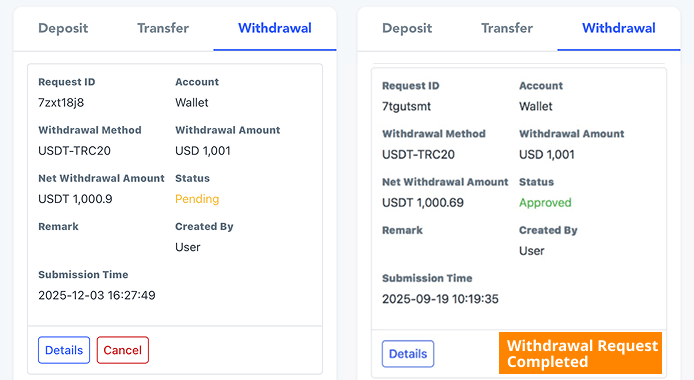
On the withdrawal history screen, the withdrawal process is complete once the status changes from “Pending” to “Approved.”
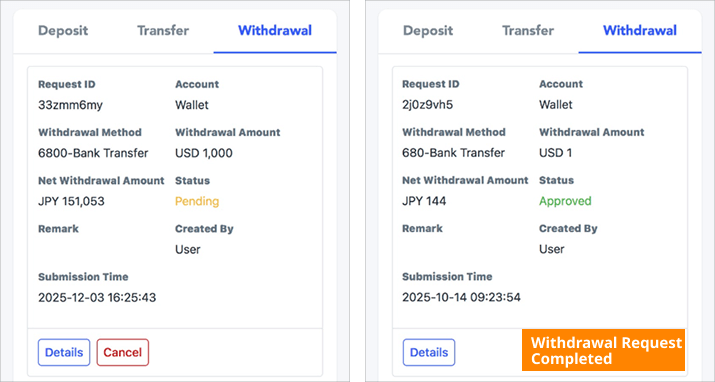

Even if your withdrawal history shows “Approved,” this does not mean the funds have already been deposited into your bank account. It indicates that RYOEX has approved your withdrawal request and the bank has begun processing it. Please note that additional time may be required before the funds are fully reflected in your account.
Crypto Withdrawal Method
Withdrawals via cryptocurrency are currently supported in USDT only.
USDT withdrawals are available with no processing fees.
The steps for completing a USDT withdrawal are outlined below.
Step 1. Open the Withdrawal Page
After logging in to My RYOEX, click “Withdrawal” directly from the dashboard, or navigate to “Funds Management” → “Withdrawal” from the menu to access the withdrawal page.
Step 2. Enter Your Withdrawal Details
-
1.
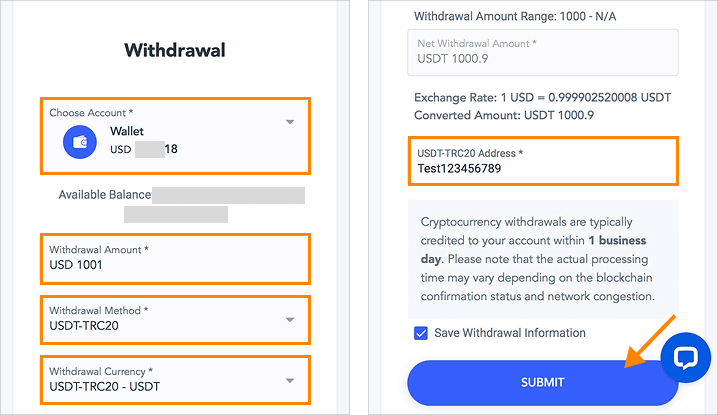
In “Select Account”, choose Wallet USD.
-
2.
Enter your desired amount in “Withdrawal Amount.” Please note that withdrawals made in USDT require a minimum of 1,000 USDT.
-
3.
In “Withdrawal Method,” select USDT - TRC20.
-
4.
If you select “Japanese Yen – JPY” under “Withdrawal Currency,” the net withdrawal amount will be automatically converted at the latest exchange rate.
-
5.
Enter your USDT - TRC20 wallet address.
-
6.
After reviewing all details, click “Confirm.” You will then be redirected to the withdrawal history page automatically.
Enabling “Save as Withdrawal Destination” will store the information you entered, allowing it to be automatically filled in for future withdrawals.
Step 3. Check Your Withdrawal Status
Once the status in your withdrawal history changes from "Pending" to "Approved", your withdrawal request has been successfully processed.
Even if the withdrawal status shows “Approved” in your withdrawal history, it does not mean that the funds will appear immediately in your designated crypto wallet. This status indicates that your withdrawal has been approved by our system and that the transfer process on the blockchain has begun. Please note that the actual receipt of funds may take additional time depending on blockchain confirmation conditions and the processing procedures of your exchange or wallet service.
Managing Withdrawal Destination Information
My RYOEX allows you to easily manage all your withdrawal destination details.
You can register and manage both bank account information used for bank transfers and wallet addresses used for cryptocurrency withdrawals.
Add New Withdrawal Destination
By registering your withdrawal information in advance, it will be automatically displayed on the withdrawal screen. You can simply select it to auto-fill the required details, allowing for a smooth withdrawal process.
The following is an example of how to add bank transfer withdrawal information.
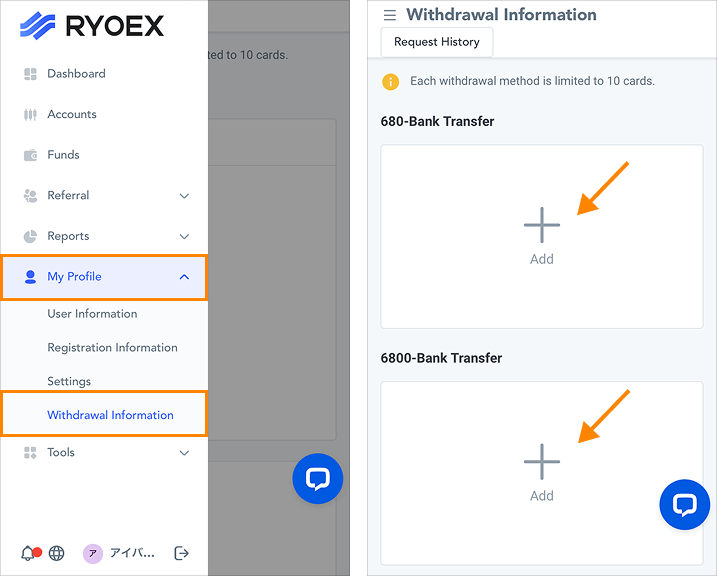
Step 1.From the My RYOEX menu, select “Personal Information” → “Withdrawal Methods” to open the withdrawal destination management screen.
Here, all available withdrawal methods such as bank transfers will be displayed in a list.
For bank transfers, four tiers of fee rates are applied depending on the withdrawal amount. Click “Register Withdrawal Destination” in the center of the withdrawal method to open the screen for adding withdrawal information.
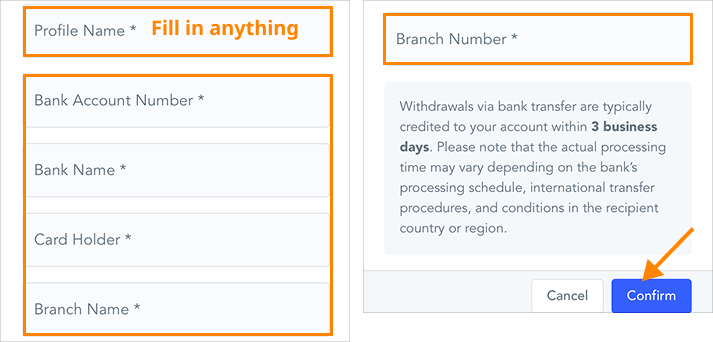
Step 2.The “Withdrawal Information Name” field is optional. Then, enter each of the following: “Account Number,” “Bank Name,” “Account Holder Name,” “Branch Name,” and “Branch Code.”
After entering all the details, click the “Confirm” button to complete the registration of your withdrawal information.
Editing and Deleting Withdrawal Information
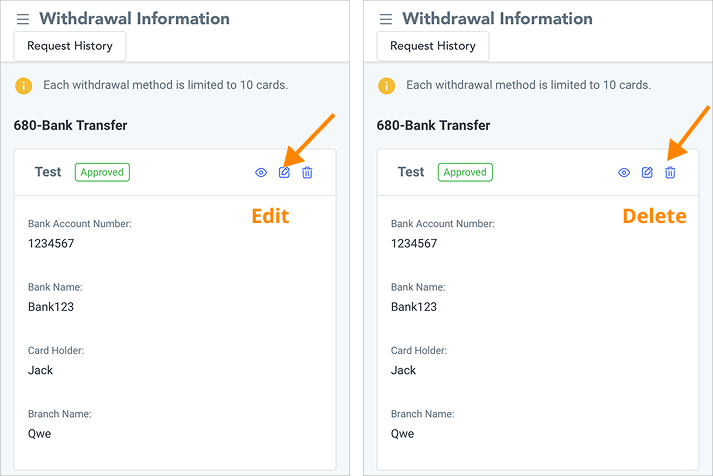
Saved withdrawal information can be edited or deleted.
When you hover your mouse over the relevant entry, the edit and delete icons will appear. Click them to perform the desired action.
Frequently Asked Questions About Withdrawals
For bank transfers: Withdrawal fees are charged according to the withdrawal amount as follows.
-
0–680 USD: 5% fee
-
680–6,800 USD: 3% fee
-
6,800–68,000 USD: 1% fee
-
Over 68,000 USD: Free
For cryptocurrency withdrawals: No fees apply (USDT only).
Withdrawals are available 24 hours a day.
However, withdrawal review and processing at RYOEX are conducted between 08:00 and 22:00 (JST).
Requests submitted outside these hours will be processed on the next business day.
For bank transfers: funds are usually reflected in your bank account within 3 business days.
Withdrawal requests submitted outside the processing hours will be handled on the next business day or later, so please be aware of this in advance.
For cryptocurrency withdrawals: funds are usually reflected in your wallet within 1 business day.
The actual reflection time may vary depending on blockchain congestion and network conditions.
Bank Transfers: There are practical limits depending on the applicable fee tiers based on the withdrawal amount.
-
0–680 USD: 5% fee
-
680–6,800 USD: 3% fee
-
6,800–68,000 USD: 1% fee
-
68,000 USD and above: Free
Cryptocurrency (USDT) Withdrawals: Minimum withdrawal amount is 1,000 USDT.
No. Currently, only USDT is available for withdrawals (minimum withdrawal amount: 1,000 USDT).
Enjoyed this article? Share it with your network!


RYOEX Official Media is an information platform created specifically for traders, offering the latest news, analysis, guides, and more. From beginners to experienced traders, we provide useful content to help you stay informed and succeed in your trading endeavors.


